Programs and files
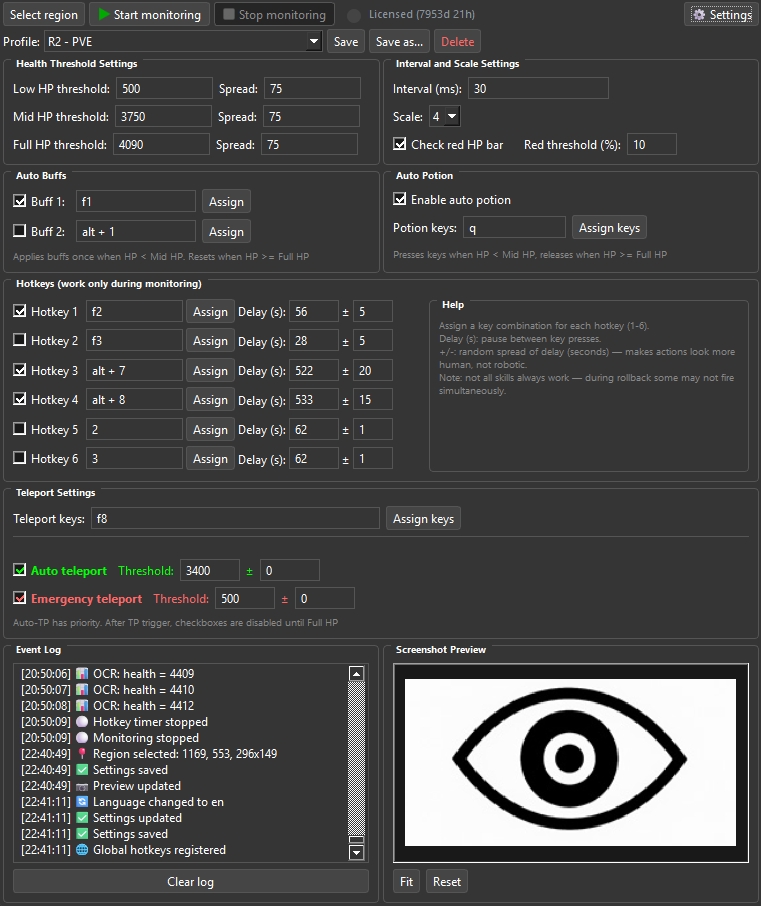
R2 - Health Monitor
Автоматизация в игре R2 Online
Description
R2 Health Monitor — это программа для мониторинга здоровья персонажа в реальном времени с автоматизацией ключевых действий.
Основные возможности:
- Распознавание уровня здоровья (HP) через захват экрана и OCR-анализ
- Автоматическое использование зелий при падении HP ниже порога
- Экстренный телепорт при критическом уровне здоровья
- Настройка горячих клавиш для навыков (до 6 комбинаций)
- Мониторинг и оповещения звуком при критических значениях
- Поддержка профилей настроек для разных игровых сценариев
Программа совместима с Windows 10 и Windows 11.
Installation Guide
Программа не требует установки — портативное приложение. Скопируйте папку в любое место и запустите SystemHelper.exe.
Две версии:
• GPU — для компьютеров с видеокартой NVIDIA. Работает быстрее.
• CPU — работает на любом компьютере.
Обязательно для любой версии:
1. Microsoft Visual C++ Redistributable x64 — скачать и установить. На большинстве ПК уже установлен — можно пропустить.
Ссылка: https://aka.ms/vs/17/release/vc_redist.x64.exe
CPU-версия:
Больше ничего устанавливать не нужно. Работает на любом компьютере с Windows.
GPU-версия:
Вам потребуется:
1. Видеокарта NVIDIA (GTX 1060 6GB или новее, желательно RTX).
2. Свежий драйвер NVIDIA — https://www.nvidia.com/drivers
3. Windows 10 или Windows 11 (x64).
CUDA Toolkit устанавливать не нужно — все CUDA-библиотеки уже в папке программы.
Как проверить, что всё работает:
1. Откройте папку программы.
2. Запустите SystemHelper.exe.
3. В окне должна отобразиться лицензия или триал.
4. GPU-версия: в логе будет «CUDA available: 1 device(s)» — видеокарта используется.
Если программа не запускается:
• VCRUNTIME140.dll not found — установите Microsoft Visual C++ Redistributable x64.
• cublas64_12.dll not found — установите CUDA Toolkit 12.x (любая 12.x): https://developer.nvidia.com/cuda-downloads
Выберите: Windows → x86_64 → 12 → Installer Type → exe (local)
• Если скачивание не удаётся — попробуйте включить VPN.
Program Settings
Настройки хранятся в файле settings.ini в папке программы.
Основные параметры:
- Sound Threshold — порог громкости для звуковых оповещений
- Mid HP Threshold — порог среднего уровня здоровья (по умолчанию 3750)
- Full HP Threshold — порог полного здоровья (по умолчанию 4190)
- Interval — интервал проверки здоровья в миллисекундах
- Scale Factor — множитель масштаба захвата изображения
- Teleport Threshold — порог HP для автоматического телепорта
Горячие клавиши:
- До 6 комбинаций, каждая настраивается отдельно
- Задержка (Delay) — пауза между нажатиями клавиш
- Spread (+/-) — случайный разброс задержки для естественного поведения
Профили:
Настройки сохраняются в профили. Можно создавать несколько профилей для разных сценариев и переключаться между ними без перезапуска.